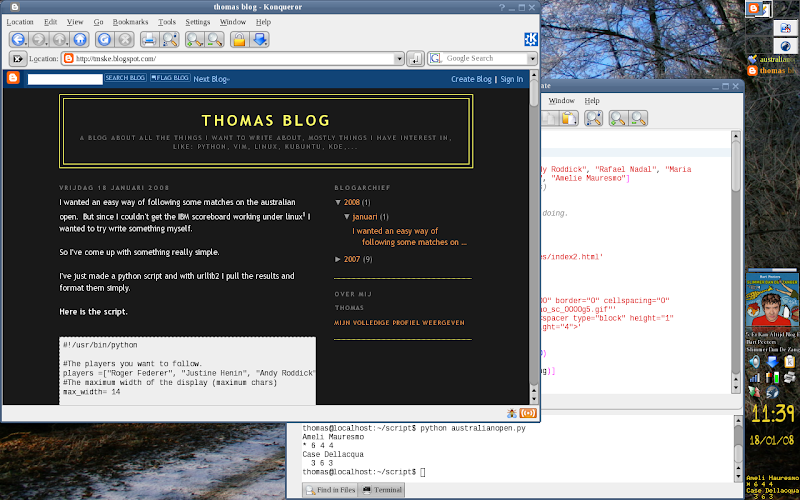
So I've come up with something really simple.
I've just made a python script and with urllib2 I pull the results and format them simply.
Here is the script.
#!/usr/bin/python
#The players you want to follow.
players =["Roger Federer", "Justine Henin", "Andy Roddick", "Rafael Nadal", "Maria Sharapova", "Lleyton Hewitt", "David Nalbandian", "Amelie Mauresmo"]
#The maximum width of the display (maximum chars)
max_width= 14
#Only change below this if you know what you're doing.
import urllib2
import urllib
url = 'http://www.australianopen.com/en_AU/scores/index2.html'
def find_player_in_data(player, data):
startString = '<table width="440" height="100" border="0" cellspacing="0" cellpadding="0" background="/images/scores/ao_sc_0000g5.gif"'
endString = '<sup></sup></td><td width="5"><spacer type="block" height="1" width="1"></td></tr><tr><td colspan="16" height="4">'
index = data.find(player)
if index != -1:
index = data.find(startString, index-200)
endIndex = data.find(endString, index)
return data[index: endIndex+len(endString)]
else:
return ""
def find_numbers(data):
lineBegin = '<td width="1"><spacer type="block" height="1" width="1"></td><td width="19" valign="middle">'
lineEnd = '</sup></td>'
first = 0
numbers = []
last = 0
while (first != (-1+len(lineBegin))):
first = data.find(lineBegin)+len(lineBegin)
last = data.find(lineEnd,first)
numbers.append(getNumber(data[first:last]))
data = data[last:]
return numbers
def find_game_number(data):
firstLine = '<td width="21" valign="middle">'
vet = "<b><b>"
first = data.find(firstLine)
if (data.find(vet) != -1):
return data[first+len(firstLine):2]
else:
return data[first+len(firstLine)+len(vet):2]
def is_serving(data):
""" returns if the player is serving or not"""
firstLine = '<td width="21" valign="middle">'
vet = "<b><b>"
first = data.find(firstLine)
return (data.find(vet) != -1)
def player(data):
start = '<td width="264" align="left" valign="middle"> <a href='
startNext = 'class="blue">'
end = "</a>"
winner_start = '<b>'
winner_end = '</b>'
first = data.find(start)
next = data.find(startNext,first)
end = data.find(end,next)
player_name = data[next+len(startNext):end]
if player_name.find(winner_start) != -1:
player_name = player_name[len(winner_start):-len(winner_end)]
win = True
else:
win = False
if len(player_name) > max_width:
player_name_list = player_name.split(" ")
first_len = max_width - (len(player_name_list[1])+1)
result = player_name_list[0][0:first_len] + " " + player_name_list[1]
return [result, win]
def getNumber(char):
if char[0].isdigit():
return char[0]
else:
return ""
def do(data):
if data == "":
return
lastBlock = '<td width="5"><spacer type="block" height="1" width="1"></td></tr><tr>'
firstBlockLastIndex = data.find(lastBlock)
first = data[0:firstBlockLastIndex]
last = data[firstBlockLastIndex:]
first_player = player(first)
last_player = player(last)
message = ""
if (first_player[1] == True | last_player[1] == True):
message += "Completed\nWinner:\n"
if (first_player[1] == True):
winner = first_player
else:
winner = last_player
message += winner[0]
else:
serving_1 = is_serving(first)
serving_2 = is_serving(last)
message = join_results(first_player[0], find_numbers(first), serving_1)
message += "\n"
message += join_results(last_player[0], find_numbers(last), serving_2)
return message
def join_results(player, numbers, serving):
result = player + "\n"
if serving == True:
result+= "* "
else:
result += " "
result += " ".join(numbers)
return result
data = urllib2.urlopen(url)
stringData = data.read()
for p in players:
data = find_player_in_data(p, stringData)
result = do(data)
if result != None:
print result
features:
show who's serving
truncate for maximum width (edit max_width in the script)
choose which players to follow (edit players in the script)
show the match winners
bugs/missing:
cannot show 15,30,40,AD,De (this should be simple to add, so maybe I'll add this later)
This script won't probably work for the double matches and if two
players in your list play against each other it will display the match
twice
how to use:
you can choose yourself but I use it in conky. (just add this line in conkyrc2: "${texeci 90 python ~/path/to/script.py}") (screenshot)
other possible use would be: a cron script and terminal, a superkaramba widget, a plasmoid,...
I know this is only a really simple script. There are probably better ways of doing this but it works and it was written fast.
If you have request, you can always ask, I'll see if I have the time for it (exams for now).
You can change the script as you like but if you made improvments it would always be cool if you shared them.
1Didn't work in konqueror, firefox nor opera (I have flash 9 installed), I wrote them an email about this but haven't yet received a response.
2To get conky working in kde I have installed feh and added this line to my conkyrc: "${exec feh --bg-scale `dcop kdesktop KBackgroundIface currentWallpaper 1`}" (source: http://briancarper.net/2006/08/25/transparent-conky-in-kde-part-2/ )